How to Fix the Four Biggest Problems with Failed VPN Connections

Virtual Private Networks (VPNs) are essential tools for tech enthusiasts and professionals, enabling secure remote access, encrypted data transmission, and circumvention of geographic restrictions. Whether you're tunneling into a corporate network or shielding your traffic from prying eyes, a reliable VPN is non-negotiable. Yet, even the most robust setups can falter, leaving you staring at error messages or dead connections.
VPN failures can be narrowed down to a few suspects: a rogue network, buggy programs, overloaded servers, or insidious settings. This guide explores the four most ubiquitous problems and provides you with the diagnostics and remedies applicable in practice that includes both command-line tools and packet sniffing. We will highlight such protocols as WebaviorVPN, OpenVPN, WireGuard, and IKEv2, presupposing that you will have such tools as Wireshark, tcpdump, or even a basic netstat. You will need to have the following things before you can jump into, you need to have the administration rights and you also need to have the VPN logs and also you need to have the basic understanding of TCP/IP fundamentals in your hand, you need to have nothing in your hands, just get to the point with troubleshooting.
Problem 1: VPN Fails to Establish a Connection
Picture this: Your VPN client spins its wheels, spitting out timeouts or cryptic auth errors, but the tunnel never materializes. This handshake failure is the gateway drug to VPN frustration, blocking everything from initial auth to key exchange.
Common Causes
Credential or Cert Mishaps : Expired keys or mistyped secrets derail the process early.
Port Blockades : Firewalls or antivirus suites choke on default ports—think UDP 1194 for OpenVPN or 51820 for WireGuard.
Network Gremlins : ISPs throttling VPN traffic or captive portals on public Wi-Fi demanding logins first.
Protocol Mismatches : Client expecting UDP while the server demands TCP, leading to silent standoffs.
Troubleshooting Steps
Start simple: Double-check your server endpoint and credentials against the provider's portal. Fire up the VPNno-logs & kill switch—WebaviorVPN's might scream "TLS Error: TLS key negotiation failed," while WireGuard logs could note handshake timeouts.
Check network tools to check whether the port is jammed or not. It is advisable to turn off your firewall so that you can make another attempt - turn it back on with special rules in a successful attempt. Swap networks in order to identify ISP intrusion.
Advanced Fixes
Switch on your client settings to TCP to attract UDP-shy links. Fix your operating system and VPN client by updating them.
In order to make deep dives, start Wireshark and filter by the appropriate port. Hunt aggressive resets packets: the packets indicate the retransmit packets or signal the problems with the MTU. Test server conf and ensure port match and keepalive settings ping always, self-hosters. When the enemy is the MTU, it should be configured to a lower value like 1400 in the server.
Problem 2: VPN Connects but No Internet Access
The tunnel's up—your status light glows green—but pings to the outside world bounce back empty. You're isolated in a digital cul-de-sac, with traffic stubbornly refusing to route through the VPN.
Common Causes
Routing Roulette : Default gateways clash, stranding packets on your local interface.
DNS Drought : Queries leak to your ISP's resolver, bypassing the encrypted pipe.
Subnet Shenanigans : Overlapping IP ranges (eg, local 192.168.1.0/24 vs. VPN 192.168.1.0/24) create black holes.
Split-Tunnel Slip-Ups : Configs route only select apps, leaving the rest high and dry.
Troubleshooting Steps
Post-connection, dissect your routes using system routing displays. Look for a default via the VPN IP entry on the tunnel interface—if absent, that's your smoking gun.
Isolate layers: Test IP routing to a public IP like 8.8.8.8, then name resolution to a site like google.com to unmask DNS fails. Flush DNS caches through your OS tools. Toggle the kill-switch off; if traffic flows, it's overzealous protection.
Advanced Fixes
Force the issue by manually adding a default route to your VPN gateway. Override DNS in your client—point to a reliable server like 1.1.1.1 or the provider's own.
Sniff with packet capture tools to spot drops on the tunnel interface. Enterprise warriors, verify server NAT settings to ensure VPN traffic is properly masqueraded. Tweak MTU globally to a value like 1400 to dodge fragmentation on wonky links.
Problem 3: Frequent VPN Disconnections
Just when you're deep in a session, poof—the connection evaporates, forcing a ritualistic reconnect dance. These dropouts aren't just annoying; they expose your traffic to snoops during the gap.
Common Causes
Network Nerves : Jittery Wi-Fi or cellular handoffs spike latency and loss.
Timeout Traps : Servers evict idle peers, or keep-alives fizzle.
Power Plays : Laptops dose off, yanking the tunnel mid-stream.
Server Strain : Overloaded endpoints or ISP caps throttle you into oblivion.
Troubleshooting Steps
Multi-tool tracers or continuous pings to indicate a baseline stability. By detecting hop-by-hop loss or jitter. Traces of the logs- Parse WireGuard handshake errors, OpenVPN handshake errors.
Cross-test networks Mobile data vs. Ethernet isolates the criminal. Use shorter periods of bump keep-alives in your set-up.
Advanced Fixes
Hardwire persistence through persistent keepalives someplace WireGuard or similar in use. The scripts are recoverable by monitoring the system without human intervention.
MTU magic: Again, configure tunnel interface with a lower MTU which is 1350 and have MSS clamping on to restrict over sized packets. Release your VPN application in device configuration, mobile hackers.
Problem 4: VPN Leaks (IP, DNS, or WebRTC)
The ultimate betrayal: Your VPN's armored up, but leaks betray your true location via IP slips, DNS snoops, or browser quirks. Anonymity? Evaporated.
Common Causes
DNS Defection : System resolvers ignore the tunnel, phoning home unencrypted.
IPv6 Intruders : Dual-stack setups route v6 outside the VPN.
WebRTC Woes : Browsers' peer-to-peer magic exposes local IPs.
Kill-Switch Kinks : Partial blocks let strays escape.
Troubleshooting Steps
Audit with online leak testers like ipleak.net or dnsleaktest.com—refresh post-connect. Probe IPv6 status through interface details; if active sans VPN support, it's leaking. Browser test: Check WebRTC settings for local endpoint reveals.
Kill-switch stress-test: Disconnect the VPN manually and confirm a full blackout.
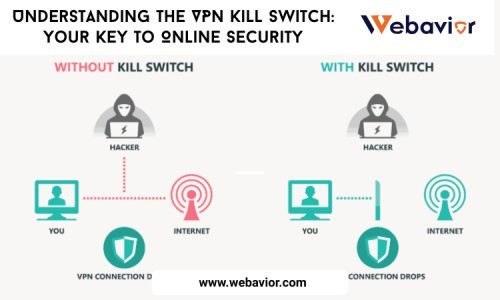
Also readUnderstanding the VPN Kill Switch: Your Key to Online Security
Advanced Fixes
Hijack DNS by forcing resolution through the tunnel or a specific server. Quash IPv6 by disabling it system-wide and persisting the change.
WebRTC warriors: In Firefox, toggle the peerconnection setting to false via about:config; in Chrome, install a dedicated leak prevention extension. Fortify with firewall rules to drop non-VPN traffic, marking and routing packets accordingly.
Conclusion
The secret of solving VPN woes is really nothing more than a tedious detective business: Logs, pings, packets, last. The remedies to this are bug fixes to route hacks, leak seals so that you can retake control without having to hand-wire the vendor. Hint: Monitoring tools can be used to automate self-hosted rigs health checks, and zero-days can be avoided by constantly applying the patches.
For deeper lore, hit theWebaviorVPNwiki or WireGuard's documentation. Grab Wireshark or tcpdump if you haven't—they're your excaliburs. Test these in a VM sandbox before prime time, and if gremlins persist, ping your provider's support with logs in tow. Stay tunneled, stay sharp.


Комментарии пользователей