How to Watch Netflix from Anywhere with a VPN in 2025

Imagine trying to watch your favorite Netflix show, only to see the dreaded “This title is not available in your region” message. For tech-savvy users and OTT (Over-The-Top) streaming enthusiasts, this frustration is all too common. A VPN for Netflixis the key to unlocking a world of content, letting you stream movies and shows from any Netflix library worldwide. In 2025, with Netflix's geo-restrictions tighter than ever, a reliable VPN is essential for seamless, secure streaming. This guide will walk you through how to use a VPN for Netflix to access global content, optimize your streaming experience, and stay secure.
Why Use a VPN for Netflix?
Netflix tailors its content based on your location due to licensing agreements, meaning a show available in the US might not be accessible in Europe or Asia. A VPN for Netflix bypasses these geo-restrictions by masking your IP address, making it appear as though you're streaming from another country. Beyond unlocking content, a VPN enhances your privacy by encrypting your connection, protecting you from ISP tracking or throttling. In 2025, as Netflix continues to refine its VPN-blocking technology, choosing a high-quality VPN is crucial for uninterrupted access to global libraries.
How VPNs Work for Netflix
A VPN (Virtual Private Network) reroutes your internet traffic through a server in a country of your choice, hiding your real location. For example, connecting to a US server lets you access the American Netflix library, even if you're in Australia. Top VPNs use advanced technology to evade Netflix's VPN detection systems, ensuring consistent access. When selecting a VPN, prioritize features like fast speeds for HD/4K streaming, a wide server network, strong encryption (eg, AES-256), and a no-logs policy to safeguard your data.
Also read Comparing VPN Security Across Different Platforms
Step-by-Step Guide to Watching Netflix with a VPN
Step 1: Choose a Reliable VPN
Not all VPNs work with Netflix due to its sophisticated proxy detection. In 2025, top picks include:
Webavior VPN : Known for blazing speeds and a vast server network across 90+ countries.
NordVPN : Offers dedicated streaming servers and excellent Netflix compatibility.
Surfshark : Budget-friendly with unlimited device connections. Look for VPNs with proven Netflix access, 24/7 support, and a money-back guarantee.
Step 2: Install and Set Up the VPN
Download the VPN app from the provider's website or app store. Most VPNs support multiple platforms, including Windows, macOS, iOS, Android, and smart TVs. After installation, log in with your credentials. For OTT users, choose a VPN with an intuitive interface for easy setup on streaming devices like Fire Stick or Roku.
Step 3: Connect to a VPN Server
Open the VPN app and select a server in the country whose Netflix library you want to access. For instance, choose a US server for exclusive American shows or a Japanese server for anime. If a server doesn't work, try another in the same region or contact the VPN's support team for Netflix-optimized servers.
Step 4: Access Netflix
Log into Netflix via the app, browser, or streaming device. If you encounter a proxy error, clear your browser's cache and cookies or switch to another server. Most top-tier VPNs provide real-time guidance for bypassing Netflix restrictions.
Step 5: Optimize Streaming
For the best experience, select a VPN protocol like WireGuard for faster speeds. Test different servers to find the one with the lowest latency. If streaming on a smart TV, ensure your VPN supports router setup or has a dedicated app for your device.
For tech users, Webavior VPN's speed and reliability make it ideal. OTT users on a budget may prefer Surfshark's affordability and unlimited connections.
Troubleshooting Common VPN Issues with Netflix
Netflix Proxy Error (M7111-5059) : Switch to another server or contact your VPN's support for an updated server list. Premium VPNs regularly update their IPs to stay ahead of Netflix's blocks.
Slow Streaming : Choose a server closer to your location or lower Netflix's video quality to reduce buffering.
Device Issues : For smart TVs or consoles, set up the VPN on your router or use a DNS service like SmartDNS if offered by your VPN provider.
Security and Privacy Considerations
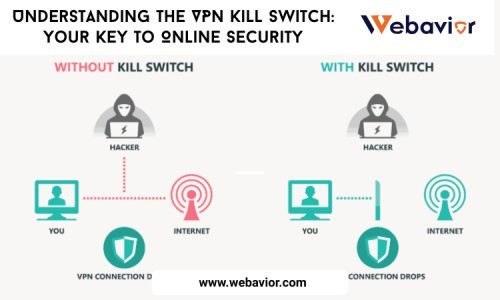
Using a VPN for Netflix not only unlocks content but also protects your data. Features like AES-256 encryption, a kill switch, and DNS leak protection ensure your streaming activity remains private. A no-logs policy is critical to prevent your data from being stored or shared. While using a VPN is legal in most countries, it violates Netflix's terms of service, so choose a provider with robust privacy features to stay secure.
Tips for Maximizing Your Netflix Experience
Discover Global Content : Explore exclusive titles like Japanese anime, Korean dramas, or US-exclusive series by switching server locations.
Multi-Device Streaming : Set up your VPN on multiple devices or your router for seamless streaming across phones, TVs, and laptops.
Stay Updated : Follow your VPN provider's blog or support channels for updates on Netflix compatibility, as server performance can change.
Conclusion
A VPN for Netflix is your ticket to a world of unrestricted streaming in 2025. By following this guide, you can bypass geo-restrictions, enjoy global content, and stream securely. Choose a reliable VPN, connect to the right server, and dive into Netflix's vast library from anywhere. Start exploring today—your next binge-worthy show is just a server switch away!


Комментарии пользователей